Canteen plan automation

 Image credit:
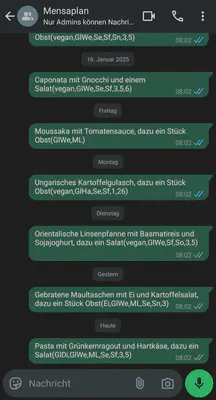
In this project, I developed a script to extract the daily menu from my university’s canteen website and automatically send it to myself (or, more specifically, to a WhatsApp group). Surprisingly, the project turned out to be much more complex than I initially anticipated.
One major challenge was finding a way to run the script daily at the same time, as this requires the device to be powered on at that specific time. My first attempt involved running the script on an old ThinkPad laptop. Unfortunately, all the operating systems I tried—such as “Puppy Linux”—were either too resource-intensive, incompatible with the required Python version, or lacked support for the web browser needed by the library I was using (pywhatkit).
I then switched to using a Raspberry Pi, which proved to be much more suitable for the task. However, another issue arose: the internet connection in my student housing wasn’t reliable enough to support the setup. To resolve this, I brought the Raspberry Pi home over the Christmas break, where I finally managed to complete the project. During this process, I decided to switch from pywhatkit to Selenium for better compatibility and functionality.
In the end, the script now works as intended! However, the Raspberry Pi currently requires a connected monitor to operate, so my next goal is to modify it to run in a headless mode.